Friday, January 29, 2016

2015 in retrospect


2015 in retrospect

The new year is upon us and it is time for me to look back on the passing year.
About this time, a year ago, I published a post on my top 3 of FME 2014, this time I have something totally different in mind.


FME Cloud

For me the past year was without a doubt a FME Cloud year.
This all started with me trying out FME Cloud, after my curiosity about FME Cloud got the better of me. I wondered what I could do with FME Cloud.

One of the many great things of FME Cloud (and Safe Software) is that you get some 'playing around' credits to test it without any need to invest your own capital.

Did you fill in the FME Server questionnaire last year? and this year? well I did and guess what?
I got even more credit to play around with FME Cloud......that was just awesome!


I soon found out that having my own FME Cloud instance made me a power player.
Having all of the transformation powers of FME Server at my fingertips and not even have to pay for it! I couldn't believe my luck.

I realized that I need a good product to be able to make a dent in the over monopolized dutch GIS sector.
That's when I came up with the idea of a self serve data transformation, which also was my first contribution the the FMEWT.

Not that self serve data transformation is something new for FME Server, but what was new about it was (and still is) is the data transformed (BGT).

Up until today there is no such service available for the BGT and even the big guns of the GIS sector are still struggling with how to service the data to its customers.
The transformation trigger for this product is an email with a link in it, quite simple and easy.

Self Serve

Self serve BGT
After the FME Cloud BGT transformation the flood gates of self serve transformations were flung open.

This resulted in a second product in which the degree of complexity got a tiny bit more complex, this time it was not a link to the data, but the data itself that got the transformation started.

This was a very important learning step for me, since working with the resources section of FME Server is crucial when switching to FME Cloud.

The third product (SPLITS Translator) was again more complex, to develop. This time the layer within the CAD trigger data needed to be specified and correctly accessed.

Fortunately the options to use parameters and transfer them between workspaces is easily done (once you figure it out) and a must have for advance FME Cloud usage.

Lastly my final 2015 FME Cloud based product (Geocoder) was the most complex of them all.
This time not only did I need to develop buit in checks to make sure that the schema of the trigger data is as required but also multiple output formats are possible.

2016

With the release of FME 2016 (desktop) and the soon to be released FME Server I am sure lots of more FME'ing will be done this year.

Happy FME'ing!


"FME Cloud" is a registered trademark of Safe Software Inc.


Friday, July 31, 2015

SPLITS Translator

SPLITS Translator

The SPLITS Translator is a FME Cloud based translation service for creating SPLITS compliant GML.
As with previous products the trigger is an email (content + attachment) which starts the translation.
The results are returned via an email with a download link.

SPLITS

The division of property lots is a normal procedure when real estate sales and housing development activities are involved. 
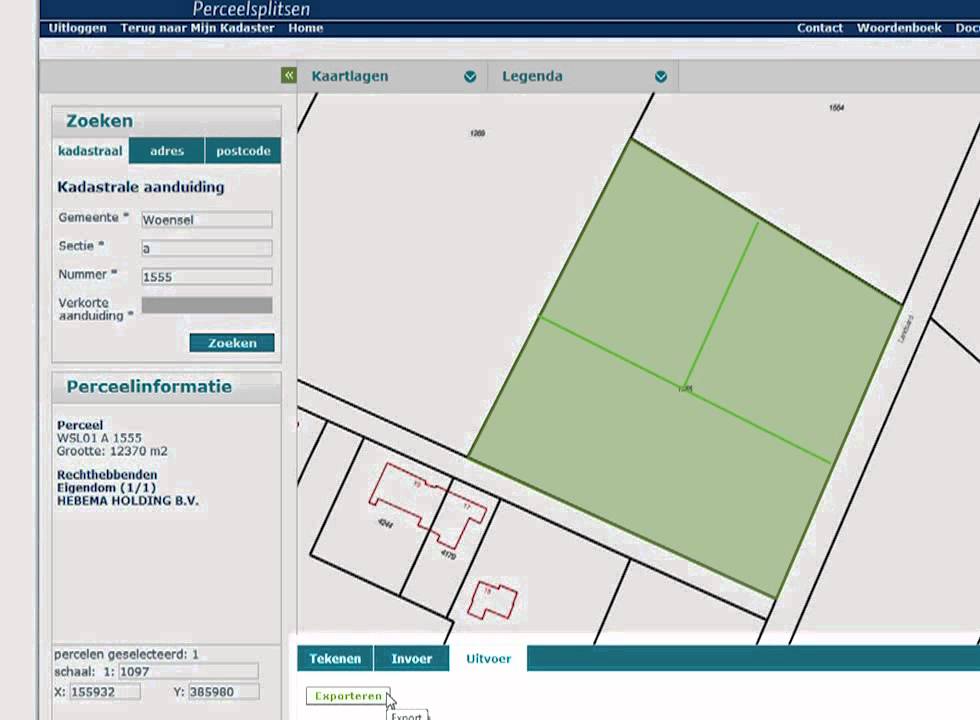
The Dutch cadastral web application SPLITS enables property lots splitting by sending all the data to the cadaster. 
The web application supports the drawing of new (temporary) boundary lines and also the use of GML (Geography Markup Language) as input. 
SPLITS application.

The use of GML has the following advantages: 
  • The drawing can take place within a professional CAD environment making it more flexible to make adjustments.
  • Multiple plots can be easily divided (think big size projects)
  • Fast processing within the application. 

FME Cloud and SPLITS

In my previous posts I have shown how you can start an event-driven ETL transformation via email + content and email + attachment
This time the FME Cloud transformation is actually a combination of the two types.
The email is the trigger and now the attachment and e-mail content are used. 


FME is the master of formats.
Master kick.
Normally you would use a separate (dedicated) reader per format, but there is also a generic reader that offers the possibility to read multiple formats with one reader. 
In this transformation I use such a generic reader that supports the most common CAD formats (DWG, DXF and DGN). 
Using the generic reader makes it is very easy to adjust the workspace in order to support other (desired) formats. 

This product has been added to the growing ETL Solution FME Cloud based products, see www.etlsolution.nl.

Also interested in event triggered FME Cloud based ETL transformations? contact me via itay@etlsolution.nl

Sunday, June 7, 2015

Transformation made easy: the FME Cloud way.

FME Cloud provides the possibilities to have data transformed and served without any detailed knowledge of the data schema or even an application.

In my previous post, based on my FMEWT 2015 presentation, I have demonstrated how easy it is to send FME an email and let FME do the heavy lifting of getting the data, transforming it and making it available.
In that scenario the user only had to select the data and send the url.
In the next scenario the user already has some data which he needs translated. So here the email is sent with an attachment.

FME Server's email capabilities are described by a series of tutorials on the FME Knowledge Center (latest name for the old FMEPedia)
In the tutorials all the information necessary for making the most out of the incoming email is addressed.

The AERIUS project  was also presented on the FMEWT, since FME is everywhere....

The AERIUS calculator is one of the components of the national PAS project which results in a GML file.
Reading GML should not be an issue for a seasoned FME user and with the help of the Knowledge Center a beginner shouldn't have much of a problem figuring out how to point to the schema document and let FME do the work.


But what if you don't have FME or you are only interested in usable results?


Well the answer to that is: FME Cloud !

To demonstrate this I have used FME's powers to build a simple and easy to use AERIUS2FGDB translation.
The translation is event triggered which means you need to start it.


How? well that's easy:

  1. send an email to: fme@etlsolution.nl
  2. Email topic: AERIUS2FGDB_b28ba3b0-0da6-11e5-a040-028deac61efd
  3. Email attachment : AERIUS GML

Result?
The AERIUS GML gets translated to filegeodatabase (FGDB) and is made available via an email with a download link.

Are just interested in testing the methodology behind the product? I have already a AERIUS GML available for you to send as an attachment.

Interested in applying this for your organisation and your specific needs? dont esitate to contact me via itay@etlsolution.nl.

Free testing this product will be available from 8/6/2015 until 10/6/2015 between 9:00 AM and 16:00 PM (CET)

Monday, May 18, 2015

BGT via FMECloud

FME Cloud

What is FME Cloud? Simply put : FME Cloud FME Server in the Cloud. FME Cloud is the first location-aware iPaaS ( Integration Platform as a Service) and that means you have all the FME Server functionality at your disposal, without the hardware . 
See the following link for more information on FME Cloud.
One of the many advantages of FME Cloud is the ability to activate processes via an external trigger (e.i. event driven ) . Examples of such an external trigger can be an e-mail or a sensor value change

BGT

The creation of the BGT ( or The Registration Large Scale Topography as Goggle translate calls it ) is in full swing , many of the stake holders are feverishly working on the assembly of this nation scale polygon map. The first stage is expected to be completed on January 2016. Stake holders deliver their part of the BGT to the national facility (LV) and it is from there made ​​available in CityGML format via PDOK (Dutch national SDI). For an overview of the already available BGT in the LV see: BGTWeb 
The CityGML format cannot be directly used in GIS applications or loaded into a database,  a format conversion (something FME is great at ) must first take place.

Event driven BGT2FGDB conversion.

FME is the tool for spatial data conversion and FME Cloud is the cloud tool for spatial data conversion :)

The trigger

The format conversion is carried out with FME Cloud and is started via a trigger, in this case the trigger is an e-mail . There are some conditions that the trigger has to meet in order to start the process, for example a selected map tile link should be provided.

The conversion

During the format conversion a number of format -specific adjustments are done. Examples of these changes include: removing specific format invalid characters , conversion to uppercase , null values ​​mapping, date conversions, new geometry is created (think of house numbering and street names labels)

The result.

The result is a uniform and complete BGT data set in FileGeodatabase ( FGDB ) format. The FGDB is a widely used and efficient GIS format . This format can be used in both closed- and open-source GIS applications. After performing the format conversion , the result is made ​​available via an e-mail with a download  link.

Advantages and properties of the conversion are : 

  • Easy to use. 
  • No application is required. 
  • Online and always available. 
  • Reliably and quickly. 
  • Outcome ready for database read-in action and GIS applications. 
  • Unique : There is no comparable data distribution method ( in the Netherlands)

Results displayed in QGIS


This product is designed for the Dutch market if you are interested and want to set up something similar please contact us via info@etlsolution.nl

Wednesday, January 14, 2015

My top 3 of FME 2014


Tomorrow is the unveiling of FME 2015 (exiting!), a good moment for me to look back at my top 3 for FME 2014.
Many great features were introduced in FME 2014 some I have used more that others and based on that I have created this top 3 FME 2014 list.


Number 3 - at my top 3 FME 2014 list.


The ability to save data directly from the Data Inspector.


This ability was present in the Universal Viewer and was temporarily unavailable in previous versions of the Data Inspector, luckily the ability was introduced back in FME 2014.
I have made considerable use of this functionality, sometimes as temporary mid-translation results and in occasions as full blown translation results.


Number 2 - at my top 3 FME 2014 list.

Canvas objects selection mode.

FME 2014 got a major face lift for the look and feel and when I occasionally use older FME versions it makes me shudder with amazement, not that older versions were that bad but still...how did I ever find the old looks acceptable?
I am now so used to the slick FME 2014 look that it makes me wonder if there can be any improvements to be made, will I get surprised again tomorrow? I sure hope so.
The ability to select canvas object overlapping the selection tool has proven to be a major improvement, which deserves a respectable second place.
This ability coupled with the objects alignment tools, make it a very powerful combined tool to easily rearrange, select canvas objects in particular and edit the canvas in its totality. Nowadays I couldn't live without it. 
The disappearance of the canvas grid was a major issue, according to a poll at the FMEUC this issue was found to be so major that it is returning in FME 2015.
I personally never really missed it and still don't understand what the fuss is about, my workspaces never looked so ordered!


Number 1 - at my top 3 FME 2014 list.

NULL support.

Bubkes
At the lunching of FME 2014, and even before full null support was introduced/announced. 
At the time I really wondered whether it will have such an effect on my dealings with data, I cant tell you that it did!
By representing null (and its variation) according to the format's manner of handling it, FME forced me to learn and understand each and every format I am using and it's handling of null values.
So in a very subtle and indirect way FME has taught me a great deal on many formats.
This for me is the number one reason why null support is at the top my 3 FME 2014 list. 


Looking forward to hear Don and Dale (always a pleasure) revealing new features and additions.
I am tuning in are you?

Wednesday, December 17, 2014

BGT 2 GBKN

The BGT.

The Registration Large Scale Topography (BGT) is a detailed topological digital map of the Netherlands in which all physical objects such as buildings, roads, water and land cover are unambiguously registered.

The last years the entire geo sector of the Netherlands is busy constructing this polygon based map that will ultimately replace the old line based map (GBKN).

This huge national endeavor encompasses ministries, national agencies, municipalities, provinces, companies and the national cadastral agency.

The transition from a line based map to a polygon map is not an easy one and requires continuous tunning and collaboration between the parties involved.

BGT in PDOK.

FME and the BGT. 

Pricipally this is a task that can be described as CAD to GIS conversion in FME terms.
Most of the dutch GIS companies are in someway involved by assisting the parties involved to assemble their part of the map.

Unfortunately a large sector of the civil engineering CAD users need to adjust their work methods to a polygon based map.

This is where FME can be used to reverse engineer the GIS map into a line based map, something that is more commonly used in the civil engineering CAD based sector.

BGT - CityGML format.

GIS 2 CAD with FME.


To demonstrate how easily this task can be done with FME, I am making use of a small part of the publicly available BGT obtained from the dutch SDI (PDOK). For more information on CAD 2 GIS translation and resource with FME see FMEpedia.


Step 1: Polygons 2 lines.

Converting polygons to lines is a no-brainer for a seasoned FME user, but you do need some tricks up your sleeve to successfully accomplish that for all of the polygon objects.

Step 2: Lines priority.

To prioritize the resulting lines I am using the AttributeValueMapper transformer, this is just one of the many way to do this, but for this example it is sufficient.

Step 3: Generating prioritized lines.

Once the priority is assigned it is a matter of making use of the priority by testing and reordering to achieve the desired results.

Final step: Writing to CAD.

Result DWG.
For the purpose of this demonstration I have created a DWG file for viewing the results. The visualization of the lines is not according to any template, but that is something that can easily be done with FME.

Real world example.

This demo is based on a solution already used by the municipality of Gorinchem.
The solution created allows the user to transform the polygon map into a DWG defined by a template file.


The solution also provides the user the ability to reorder the generated lines, set new visualization rules and decide with layers should be included in the output.

If you don't believe me, just ask Hans......

Small tip for reading the BGT in FME, use the CityGML reader with the imgeo xsd provided by Geonovum or simply download this workspace and follow the instructions.

Wednesday, October 22, 2014

Heat maps and FME.

Heat map.

Heat map.

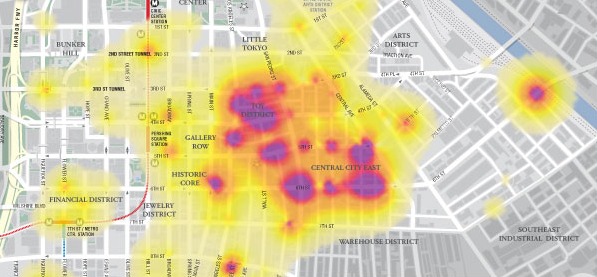
According to Wikipedia a heat map is a graphical representation of data where the individual values contained in a matrix are represented as colors.
In the past heat maps were mostly used in other sectors (biology, statistics, etc.) than the geospatial sector, where maps are the obvious way of data representation.
Nowadays there are plenty of resources to transform your data into a spatial heat map representation.


Google heat map.

The Google Developers site provides a multitude of resources and samples on how to used and incorporate Google's products. 
The Google Maps JavaScript demonstrates how a spatial heat map is created via a simple JavaScript.
Without going into too much details, the script's components include location data, a map center point and visualizations options (colors, gradients and additional functions)


JavaScript in FME.

If you mention JavaScript to an FME user, he will probably think you mean GeoJSON since that is the most common way for spatially representing Java objects (JSON or 'XML's Baby brother' )
There are dedicated readers and writers for JSON in FME and plenty of resources on the subject to be found at FMEpedia.
Since the script is essentially plain text, FME can be used to manipulate the script with a simple text writer.


Input.

highway location marker.
To demonstrate how essentially any spatial data can be represented by a heat map via FME, I made use of the national roads dataset (NWB) freely available via the Dutch SDI (PDOK)
The features used are highway location markers (point features) but also line and polygon features can be potentially represented via heat maps.

Workspace.

Actually it is a very simple workspace in which I am extracting the point coordinates into attributes, reprojecting them and concatenating them into the predefined order.
To extract the map center point a BoundingBoxAccumulator, CenterPointReplacer are used on the national border. Finally the CsmapReprojector transformer is used to bring it into the desired coordinate system (LL84).

Result.

The result is a html file that can be viewed with most browsers.
In this case I have only used FME on 3 script components and added some images into the header.
Potentially other components such as gradient colors and styling can also be directly manipulated.


The Netherlands - highway location markers heat map.