Showing posts with label FME. Show all posts

Saturday, May 13, 2017

New annotation option in FME 2017

Annotations in FME

Annotations are an easy way to include description in a workspace.
There are 3 types of annotations in FME:
  1. Header annotations that are only generated when a workspace is generated.
  2. Summary annotations that are dynamic and reflect the changes in a workspace component (transformer, feature type, etc)
  3. Custom annotations are generally known as user annotations.

The image below shows all 3 annotation types.
The header annotations are above the reader and writer feature types and connection, the summary annotations is blue and describes the reader feature type, while the user annotation is by default yellow and empty of content.

The Magic of FME 2017

The #FMEWT is about to finish for 2017 and I had the luck to present in it, if you are interested in my presentation here is a link
During the preparation of the presentation I came across an unknown (for me) new functionality in the Workbench application.
This new functionality is the ability to transform ;) a summery annotation into a user annotation.
Just right click on the summary annotation and select 'Convert to Attached Annotation'

If you are a Copy& Paste kinda of a person, as I am, then this is mana from heaven.....
Now I can create a summary annotation and edit it, something that can save a lot of time.

So next to the Parameter Editor this is another excellent addition that can boost your FME development productivity.

Have Fun!

Saturday, January 14, 2017

PDOK Geocoder Service

The new geocoding service (Locatieserver)


The Dutch National SDI (Spatial Data Infrastructure) PDOK has recently introduced a new geocoding service (Locatieserver) that will in due time replace the current one.
The new service is very well documented, based on open source stack, available to all and the PDOK community is available for information about the service and eventual feedback. Naturally most of the information available is in Dutch.
For these same reasons I am not going to go into details about the services.

FME and the Locatieserver

Essentially  the geocoding service is an API and communicating with a API's is well demonstrated in the Safe Software Blog.

There are however a few issues that needs some mentioning, especially if you can't read Dutch ;)

  • The geocoding service is based on the BAG, the national building and addresses registration system.
  • The geocoding service enables you to choose from two different types of services. The free service, which is comparable to the current geocoding service and the suggest & lookup service that is composed of two endpoints that essentially work together.
  • The geocoding services offer a wide range of options that are not available in the current geocoding service.

Putting it all together

Back in 2013 when I started writing about FME and share examples on how to use it, there was no real easy way how to share your workspaces, beside the making them available for download of mailing them.
Luckily nowadays the FME Hub is incorporated into the Workbench application, which makes it very easy to grab a transformer created by somebody else.

For demonstration purposes I have actually decided on sharing a template and not a transformer.
My intention is to demonstrate how you can make a simple start with this service and FME especially when taking in consideration all the options this services provides.

PDOKLocatieserver template

The template

A FME template is a great way of sharing workspaces because you can incorporate the source data in it. In this specific case the source is an online CSV file that contains addresses of educational facilities.
As simple validation and clearing some duplicate data is done and then the service type selection is done via a Tester transformer and user parameter.
The geocoding services return JSON by default, but XML is also available for the XML savvies.

Both types of services return multiple results and each result as a score. The highest the score value the highest the probability that it's the best match.

Once the result with the highest score is sorted per request it a simple matter to transform it into a point feature with the GeometryReplacer transfomer.

I have selected to use the geometrie_rd attribute to which contains the coordinate values in the Dutch national coordinate system, if you are more internationally oriented the service also returns a set of coordinates in WGS84.

The results are written into a SQLlite database, a format that is supported by most of the open source and propriety GIS applications.

What to try it out yourself? first of all download FME 2017 (still in Beta while writing this post) and check out FME Hub for the template.

Have Fun!
    

Thursday, December 29, 2016

2016 in retrospect

The end of the year is nearing and it is time to look back at the passing year and list my top 3 of FME 2016 functionalities.
At the same time its also a time to look forward to the coming year and the upcoming FME functionalities in FME 2017.

This year I actually wanted to combine both aspects into a double top 3, first my top 3 of FME 2016 functionalities and a second top 3 which involves a new FME 2017 functionality.


I hope I am not giving away a functionality that Safe intends to blog about, so if that is the case....my apologies in advance.
But personally I think that there will be so many awesome additions in 2017 that the little bit I am using doesn't even make a small dent in the pile of 2017 goodies that Safe can use to blog about.

My FME 2016 top 3

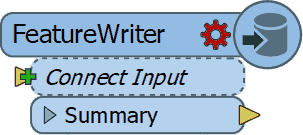
1. FeatureWriter

2016 started with the announcement (for me it felt more like a meteor fall...) that in the future FME will be used without any Readers and Writers
You probably all know what I am referring to, the birth of the FeatureWriter,
the transformer that would ".... shake most FME users to their very core!"

I have to admit that initially I didn't see what all the excitement was about, but as the year worn on and I started using it more and more, I can tell you right now that I wouldn't know how I could have done without it! (well probably using a lot more workspacesto get the same job done)

So it's no surprise that it is by far the number 1 on my top 3 for FME 2016 functionalities. Personally I think Safe succeeded in delivering what they promised and that the time of no Readers and Writers workspaces is nearing.

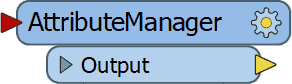
2. AttributeManager

The AttributeManager  was another FME 2016 functionality which slowly changes our approach into data transformation and in a good way.
No more AttributeCopier, AttributeCreator, AttributeRenamer, etc, etc necessary, a single super transformer to replace them all.

Personally I really like the AttributeManager for it capabilities, but there is one small annoying issue with it and that is the fact that it requires my attention way to often when the data schema changes.

So I have resorted to update the AttributeManager content when the workspace is finished, instead of continuously updating it. Despite that the AttributeManager makes so much possible with one single transformer and that is why it's my number 2 on the top 3 of FME 2016 functionalities.


3.WFS Paging settings
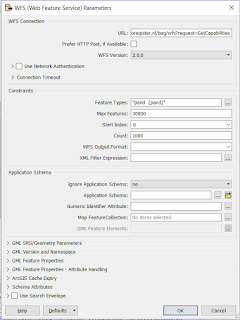
My previous post was on this awesome functionality (secretly?) added to the WFS reader .
If you use WFS OGC services a lot then I bet you are as exited as I am about this hidden gem.

In the past I have demonstrated how to use ResponcePaging in FME, but that required some inventive workaround to get all the features and overcoming the service's limitations.

Nowadays it's a matter of setting the reader settings accordingly, lean back and enjoy the logging happily passing by, while the service is queried.

For that sole reason, making my (and hopefully anybody that uses OGC WFS services) life easier I am giving the bronze medal to this FME 2016 functionality (my number 3)


This concludes my personal top 3 of FME 2016, I had lots of fun playing around with data this past year thanks to Safe Software and their great product.
I am expecting to have as much, if not more, fun with the upcoming FME 2017 functionalities.

The other top 3

Since the FME beta is always available and it's a great place to find out about new functionalities, I was searching for an idea for a post when I saw this tweet from @MadMansson which made me remember an old post where a list of certified FME professionals was created by parsing the HTML page of the Safe Software site.

So where does this all come together?  In FME 2017! where we can easily parse HTML with the brand new HTMLExtractor transformer (note to myself get cracking on CSS selectors).

So as a small homage to the previous post I put together a small workspace in which the countries with FME certified professionals are ordered by a ratio of the number of certified professionals per country divided by the country's area.

You might wonder what are the area units, well I just grabbed the first hit on Google for world countries shape and it is in the LL-WGS84 coordinate system.

Another thing to mention is that when I initially made the workspace Luxembourg was number one, but as you see recently somebody joined the club (welcome!) and now it is Singapore leading the list.

According to the same shapefile there are 43 other countries with a smaller area than Singapore, so if you are from Macau and you plan to get certified, I can promise you an eternal first on this list :)

The HTMLExtractor transformer makes it easy to grab information from the web pages and I personally think we will see more web related functionalities coming in FME 2017.

Looking forward to it!

Have a great New Year!


Tuesday, November 8, 2016

WTwFs?

HU?

I wanted to share with you something I accidentally came across while playing around with FME.
After finding this I was astonished that no special (spatial?) reference to this addition was made other than the standard documentation.

Doing a bit of snooping around I've found this addition was already added to the 2016.1.0.0 (build 16492) FME Desktop version.


Well what's it all about? well lets say that I consider it to be as much as a game changer as the introduction of THE game changer of  FME 2016, the FeatureWriter.

It might not be as all encompassing as the FeatureWriter itself, but it does make it a lot easier for many people that work with OGC services on a daily basis.

OGC

Several OGC (Open Geospatial Consortium) services formats have been supported for some time now in FME Desktop.

http://www.opengeospatial.org/
The Web Map Service (WMS) is great as a background map in your Data Inspector, but other than that there is not much use for it.

Now the WFS (Web Feature Service) that's more like it! Data that we can play around with in FME to transform, combine and write to our favorite formats.

The WFS comes in different versions and each version allows for a different interaction with the service.


The services are usually restricted to allow a certain maximum number of features to return per request. That is done so that the system serving the data should not be overrun by requesting all the features in one go.

The 2.0.0 version allows for ResponsePaging which is the mechanism that allows users to request all the data but in a orderly manner.

ResponsePaging 

In the past I have shown how it is possible to use this mechanism in FME, but now its made even easier!

Now is response paging incorporated into the WFS reader, so that once you select the 2.0.0 services version, new settings specific for response paging are available.


The Start Index and Count parameters enable you to control the response paging, sit back and relax as FME manages the data requests for you.

First of all excellent addition! but what blows my mind is that NO MENTION of this was reported or communicated!!
I really think you guys at FME headquarters need to take some more credit.


I know for sure that you just made my life and lots of others easier so that we can do this...


while FME is doing the heavy lifting.


Tuesday, March 1, 2016

XML is all around us

The Past

In 2014 I wrote about how to get all of the Dutch SDI (PDOK) services into FME by creating a custom reader.

With the new XML abilities in FME 2016, I was wondering if a better job can be done.

I set about creating a second custom reader that not only returns constantly updated results (services url's) but provides them in such a way that can be directly used futher down the transformation.

The Present

The new XML abilities in FME 2016 makes life so much easier. It's still early in the year but I am already sure that the new ability to scan the input XML is one of my top 3 of FME 2016.

Couple that with the setting to limit the maximum schema features to scan, and you get a very powerful tool that makes the days of wrestling with large XML files history.

The PDOK URL Reader

As with the previous custom reader, all of the services provided by PDOK are returned by the reader.
During the development I actually got a verification that the reader works properly since 2 new services were automatically added to the reader's results.

As mentioned before, I wanted to improve the previous reader, this time an attribute (ServiceFeatureType) containing the WFS feature types is provided.
This attribute, along with the url attribute, can be directly used in the FeatureReader transformer to access the WFS service.

Why only the WFS services? the short answer is that FME is all about data transformation and there is no point in making the feature types of the other services types (WMS, WCS and WMTS) available, because you cannot do much with them anyway.

The Future

The future is already here! (well if you were a kid in the 80's)
Anyway what I mean to say is that nowadays is it much easier to share.

The FME Hub is a new feature that makes sharing and publishing much easier. I wonder if it is the future of the FME Store, but that can only be verified by somebody from Safe.

The FME hub is where you can also find my PDOKURLReader among other amazing stuff.
This reader is self-updating and lets you for example access all of the PDOK WFS features of a specific area.

The following workspace shows how you could go about achieving that.
Example FME workspace

The results look like this.

BAG and AAN WFS features
Have fun and let me know what you think of it.

"FME" is a registered trademark of Safe Software Inc.

Sunday, June 7, 2015

Transformation made easy: the FME Cloud way.

FME Cloud provides the possibilities to have data transformed and served without any detailed knowledge of the data schema or even an application.

In my previous post, based on my FMEWT 2015 presentation, I have demonstrated how easy it is to send FME an email and let FME do the heavy lifting of getting the data, transforming it and making it available.
In that scenario the user only had to select the data and send the url.
In the next scenario the user already has some data which he needs translated. So here the email is sent with an attachment.

FME Server's email capabilities are described by a series of tutorials on the FME Knowledge Center (latest name for the old FMEPedia)
In the tutorials all the information necessary for making the most out of the incoming email is addressed.

The AERIUS project  was also presented on the FMEWT, since FME is everywhere....

The AERIUS calculator is one of the components of the national PAS project which results in a GML file.
Reading GML should not be an issue for a seasoned FME user and with the help of the Knowledge Center a beginner shouldn't have much of a problem figuring out how to point to the schema document and let FME do the work.


But what if you don't have FME or you are only interested in usable results?


Well the answer to that is: FME Cloud !

To demonstrate this I have used FME's powers to build a simple and easy to use AERIUS2FGDB translation.
The translation is event triggered which means you need to start it.


How? well that's easy:

  1. send an email to: fme@etlsolution.nl
  2. Email topic: AERIUS2FGDB_b28ba3b0-0da6-11e5-a040-028deac61efd
  3. Email attachment : AERIUS GML

Result?
The AERIUS GML gets translated to filegeodatabase (FGDB) and is made available via an email with a download link.

Are just interested in testing the methodology behind the product? I have already a AERIUS GML available for you to send as an attachment.

Interested in applying this for your organisation and your specific needs? dont esitate to contact me via itay@etlsolution.nl.

Free testing this product will be available from 8/6/2015 until 10/6/2015 between 9:00 AM and 16:00 PM (CET)

Monday, May 18, 2015

BGT via FMECloud

FME Cloud

What is FME Cloud? Simply put : FME Cloud FME Server in the Cloud. FME Cloud is the first location-aware iPaaS ( Integration Platform as a Service) and that means you have all the FME Server functionality at your disposal, without the hardware . 
See the following link for more information on FME Cloud.
One of the many advantages of FME Cloud is the ability to activate processes via an external trigger (e.i. event driven ) . Examples of such an external trigger can be an e-mail or a sensor value change

BGT

The creation of the BGT ( or The Registration Large Scale Topography as Goggle translate calls it ) is in full swing , many of the stake holders are feverishly working on the assembly of this nation scale polygon map. The first stage is expected to be completed on January 2016. Stake holders deliver their part of the BGT to the national facility (LV) and it is from there made ​​available in CityGML format via PDOK (Dutch national SDI). For an overview of the already available BGT in the LV see: BGTWeb 
The CityGML format cannot be directly used in GIS applications or loaded into a database,  a format conversion (something FME is great at ) must first take place.

Event driven BGT2FGDB conversion.

FME is the tool for spatial data conversion and FME Cloud is the cloud tool for spatial data conversion :)

The trigger

The format conversion is carried out with FME Cloud and is started via a trigger, in this case the trigger is an e-mail . There are some conditions that the trigger has to meet in order to start the process, for example a selected map tile link should be provided.

The conversion

During the format conversion a number of format -specific adjustments are done. Examples of these changes include: removing specific format invalid characters , conversion to uppercase , null values ​​mapping, date conversions, new geometry is created (think of house numbering and street names labels)

The result.

The result is a uniform and complete BGT data set in FileGeodatabase ( FGDB ) format. The FGDB is a widely used and efficient GIS format . This format can be used in both closed- and open-source GIS applications. After performing the format conversion , the result is made ​​available via an e-mail with a download  link.

Advantages and properties of the conversion are : 

  • Easy to use. 
  • No application is required. 
  • Online and always available. 
  • Reliably and quickly. 
  • Outcome ready for database read-in action and GIS applications. 
  • Unique : There is no comparable data distribution method ( in the Netherlands)

Results displayed in QGIS


This product is designed for the Dutch market if you are interested and want to set up something similar please contact us via info@etlsolution.nl

Wednesday, December 17, 2014

BGT 2 GBKN

The BGT.

The Registration Large Scale Topography (BGT) is a detailed topological digital map of the Netherlands in which all physical objects such as buildings, roads, water and land cover are unambiguously registered.

The last years the entire geo sector of the Netherlands is busy constructing this polygon based map that will ultimately replace the old line based map (GBKN).

This huge national endeavor encompasses ministries, national agencies, municipalities, provinces, companies and the national cadastral agency.

The transition from a line based map to a polygon map is not an easy one and requires continuous tunning and collaboration between the parties involved.

BGT in PDOK.

FME and the BGT. 

Pricipally this is a task that can be described as CAD to GIS conversion in FME terms.
Most of the dutch GIS companies are in someway involved by assisting the parties involved to assemble their part of the map.

Unfortunately a large sector of the civil engineering CAD users need to adjust their work methods to a polygon based map.

This is where FME can be used to reverse engineer the GIS map into a line based map, something that is more commonly used in the civil engineering CAD based sector.

BGT - CityGML format.

GIS 2 CAD with FME.


To demonstrate how easily this task can be done with FME, I am making use of a small part of the publicly available BGT obtained from the dutch SDI (PDOK). For more information on CAD 2 GIS translation and resource with FME see FMEpedia.


Step 1: Polygons 2 lines.

Converting polygons to lines is a no-brainer for a seasoned FME user, but you do need some tricks up your sleeve to successfully accomplish that for all of the polygon objects.

Step 2: Lines priority.

To prioritize the resulting lines I am using the AttributeValueMapper transformer, this is just one of the many way to do this, but for this example it is sufficient.

Step 3: Generating prioritized lines.

Once the priority is assigned it is a matter of making use of the priority by testing and reordering to achieve the desired results.

Final step: Writing to CAD.

Result DWG.
For the purpose of this demonstration I have created a DWG file for viewing the results. The visualization of the lines is not according to any template, but that is something that can easily be done with FME.

Real world example.

This demo is based on a solution already used by the municipality of Gorinchem.
The solution created allows the user to transform the polygon map into a DWG defined by a template file.


The solution also provides the user the ability to reorder the generated lines, set new visualization rules and decide with layers should be included in the output.

If you don't believe me, just ask Hans......

Small tip for reading the BGT in FME, use the CityGML reader with the imgeo xsd provided by Geonovum or simply download this workspace and follow the instructions.

Wednesday, October 22, 2014

Heat maps and FME.

Heat map.

Heat map.

According to Wikipedia a heat map is a graphical representation of data where the individual values contained in a matrix are represented as colors.
In the past heat maps were mostly used in other sectors (biology, statistics, etc.) than the geospatial sector, where maps are the obvious way of data representation.
Nowadays there are plenty of resources to transform your data into a spatial heat map representation.


Google heat map.

The Google Developers site provides a multitude of resources and samples on how to used and incorporate Google's products. 
The Google Maps JavaScript demonstrates how a spatial heat map is created via a simple JavaScript.
Without going into too much details, the script's components include location data, a map center point and visualizations options (colors, gradients and additional functions)


JavaScript in FME.

If you mention JavaScript to an FME user, he will probably think you mean GeoJSON since that is the most common way for spatially representing Java objects (JSON or 'XML's Baby brother' )
There are dedicated readers and writers for JSON in FME and plenty of resources on the subject to be found at FMEpedia.
Since the script is essentially plain text, FME can be used to manipulate the script with a simple text writer.


Input.

highway location marker.
To demonstrate how essentially any spatial data can be represented by a heat map via FME, I made use of the national roads dataset (NWB) freely available via the Dutch SDI (PDOK)
The features used are highway location markers (point features) but also line and polygon features can be potentially represented via heat maps.

Workspace.

Actually it is a very simple workspace in which I am extracting the point coordinates into attributes, reprojecting them and concatenating them into the predefined order.
To extract the map center point a BoundingBoxAccumulator, CenterPointReplacer are used on the national border. Finally the CsmapReprojector transformer is used to bring it into the desired coordinate system (LL84).

Result.

The result is a html file that can be viewed with most browsers.
In this case I have only used FME on 3 script components and added some images into the header.
Potentially other components such as gradient colors and styling can also be directly manipulated.


The Netherlands - highway location markers heat map.


Wednesday, October 1, 2014

Georeferencing evaluation with FME.

FME and data evaluation.

FME is a great tool to validate and evaluate data (next to the many things you can do with FME)
There are plenty of resources available on the subject demonstrating FME's data validation and Q&A capabilities.

Data evaluation can involve different aspects and have many forms.
For this post I choose to evaluate how well a publicly available data set can be georeferenced (if you can add value to it and put it on a map, why shouldn't you...)
For any serious conclusions, you'll have to work it out yourself, since my main intention is to demonstrate FME capabilities (and not bad mouth anybody particularly...)

Data source.


The Dutch government publishes many data sets openly and the numbers are increasing all the time.
I choose to use the data set of the national education registry since it is highly dynamic and it contains addresses, which makes it possible to potentially georeference the features.

The data used is available in csv format, which can easily be accessed online via the CSV reader (just point it to the url). For limiting sorting and filtering the incoming data, see my previous post: Where clause on text.
This results in a continuously updated data source, which is great to have but poses a challenge when displaying the results.

 Georeferencing the data.


    For georeferencing the source data I am using the BAG Geocoding service, available via the National SDI.
    An easy way in FME to access the service is by a HTTPFetcher transformer.
    By constructing the URL in the transformer's text editor and making use of attributes values, a very flexible solution is created.

    BAG Geocoding service results.

    The BAG Geocoding service returns the location(s) in an XML snippet that translates into geometry and attributes. In case of ambiguity or lack of sufficient input, the service returns an aggregate geometry.
    Somewhere in the aggregate geometry the corresponding location and attributes can be found (well most of the times...)
    Using the total count of both georeferenced and failed features, simple statistics (percentage of correct georeferencing) can be gathered and used for display.

    HTTPFetcher

    Interpreting the results.

    Some of the 'failed' to georeference features do actually exist (BAG Web) and can be correctly geocoded by slightly changing the address used, see for example georeferenced (note the street tag) and not georeferenced (note URL used =  input address)

    Displaying the results.

    I am using Google Fusion Tables to display  the results since it is an easy way to share geographical information (article is in dutch)
    Also non-spatial data can be shared this way and the failed features are saved into a non-spatial Google Fusion Table. Needless to say FME supports both spatial and non spatial reading and writing of this format.
    Some limitations of this format are the number of features supported and that it is still considered an experimental format, something that unfortunately makes it less reliable.
    As mentioned before the input source data is updated frequently and in contrast the displayed results are static and present a moment in time.


    Map of results, created 1-10-2014.

    Findings and (possible) future developments.

    A way to keep the displayed results up to date would be to use FME Cloud, something I still have not got around to try. I imagine that using FME Cloud to run this workspace would not require almost any resources or adaptations, since most of the data is on-line.
    Some of the finding are:

    • Saving the source csv data is necessary due to memory issues (something that is easily done in the HTTPFetcher)
    • Another curious issue found is that using the postcode in the request string actually results in less features georeferenced.
    Don't forget that by the time you read this post the output might look very different.

    Sunday, September 7, 2014

    FME and 3D printing.

    3D printing.

    3D printing has been around since the 1980's, but it is only in the last few years that a real boom in its application has taken place especially for domestic use.
    The most commonly used format (e.i de facto standard) is the STL, which comes in two types (ASCII and Binary).
    3D print.

    STL format and FME.

    If you search for this format in the Readers and Writers documentation, you will find that FME does not support it.
    Well not directly since no reader or writer are available, but indirectly, because it is plain text and FME can create and write STL files.

    3DS to STL transformation.

    There are lots of 3D files available on the web, and since it was around lunch time... I have selected this fork for testing.
    3DS in the Data Inspector.
    The 3DS fork is represented as a IFMEMesh geometry, which is to say that it is composed of parts that do not necessarily have a topological or spatial relationship.

    These are also the parts that need to be represented in the STL format, adhering to simple format definitions.

    So its not surprise that with FME the mesh geometry can be transformed and written to the STL format.

    Workspace.

    The workspace is quite simple and there are but a few steps necessary.
    1. Firstly decomposing the geometry to its components.
    2. the coordinates are extracted into attributes, here is also where I drop the geometry since it is not needed anymore (get rid of anything unnecessary, another FME rule).
    3. Some formatting is taking place to represent the coordinates as floating point numbers (StringFormatter), although some applications export into STL without the floating point representation.
    4. Finally creating the output by aggregating the coordinate values and concatenation.
    A text file writer is all that is necessary to write the STL format.

     Result.

    Result STL file.
    Since FME does not support the STL format it cannot be viewed in the Data Inspector, but no worries there are plenty of visualization tools available.
    I am using the freely available Meshmixer to display the result.

    I dont have a 3D printer, so in case you have tried yourself to create a STL file with FME and printed the result, it would be great to know.