Showing posts with label Safe Software. Show all posts

Saturday, May 13, 2017

New annotation option in FME 2017

Annotations in FME

Annotations are an easy way to include description in a workspace.
There are 3 types of annotations in FME:
  1. Header annotations that are only generated when a workspace is generated.
  2. Summary annotations that are dynamic and reflect the changes in a workspace component (transformer, feature type, etc)
  3. Custom annotations are generally known as user annotations.

The image below shows all 3 annotation types.
The header annotations are above the reader and writer feature types and connection, the summary annotations is blue and describes the reader feature type, while the user annotation is by default yellow and empty of content.

The Magic of FME 2017

The #FMEWT is about to finish for 2017 and I had the luck to present in it, if you are interested in my presentation here is a link
During the preparation of the presentation I came across an unknown (for me) new functionality in the Workbench application.
This new functionality is the ability to transform ;) a summery annotation into a user annotation.
Just right click on the summary annotation and select 'Convert to Attached Annotation'

If you are a Copy& Paste kinda of a person, as I am, then this is mana from heaven.....
Now I can create a summary annotation and edit it, something that can save a lot of time.

So next to the Parameter Editor this is another excellent addition that can boost your FME development productivity.

Have Fun!

Saturday, January 14, 2017

PDOK Geocoder Service

The new geocoding service (Locatieserver)


The Dutch National SDI (Spatial Data Infrastructure) PDOK has recently introduced a new geocoding service (Locatieserver) that will in due time replace the current one.
The new service is very well documented, based on open source stack, available to all and the PDOK community is available for information about the service and eventual feedback. Naturally most of the information available is in Dutch.
For these same reasons I am not going to go into details about the services.

FME and the Locatieserver

Essentially  the geocoding service is an API and communicating with a API's is well demonstrated in the Safe Software Blog.

There are however a few issues that needs some mentioning, especially if you can't read Dutch ;)

  • The geocoding service is based on the BAG, the national building and addresses registration system.
  • The geocoding service enables you to choose from two different types of services. The free service, which is comparable to the current geocoding service and the suggest & lookup service that is composed of two endpoints that essentially work together.
  • The geocoding services offer a wide range of options that are not available in the current geocoding service.

Putting it all together

Back in 2013 when I started writing about FME and share examples on how to use it, there was no real easy way how to share your workspaces, beside the making them available for download of mailing them.
Luckily nowadays the FME Hub is incorporated into the Workbench application, which makes it very easy to grab a transformer created by somebody else.

For demonstration purposes I have actually decided on sharing a template and not a transformer.
My intention is to demonstrate how you can make a simple start with this service and FME especially when taking in consideration all the options this services provides.

PDOKLocatieserver template

The template

A FME template is a great way of sharing workspaces because you can incorporate the source data in it. In this specific case the source is an online CSV file that contains addresses of educational facilities.
As simple validation and clearing some duplicate data is done and then the service type selection is done via a Tester transformer and user parameter.
The geocoding services return JSON by default, but XML is also available for the XML savvies.

Both types of services return multiple results and each result as a score. The highest the score value the highest the probability that it's the best match.

Once the result with the highest score is sorted per request it a simple matter to transform it into a point feature with the GeometryReplacer transfomer.

I have selected to use the geometrie_rd attribute to which contains the coordinate values in the Dutch national coordinate system, if you are more internationally oriented the service also returns a set of coordinates in WGS84.

The results are written into a SQLlite database, a format that is supported by most of the open source and propriety GIS applications.

What to try it out yourself? first of all download FME 2017 (still in Beta while writing this post) and check out FME Hub for the template.

Have Fun!
    

Thursday, December 29, 2016

2016 in retrospect

The end of the year is nearing and it is time to look back at the passing year and list my top 3 of FME 2016 functionalities.
At the same time its also a time to look forward to the coming year and the upcoming FME functionalities in FME 2017.

This year I actually wanted to combine both aspects into a double top 3, first my top 3 of FME 2016 functionalities and a second top 3 which involves a new FME 2017 functionality.


I hope I am not giving away a functionality that Safe intends to blog about, so if that is the case....my apologies in advance.
But personally I think that there will be so many awesome additions in 2017 that the little bit I am using doesn't even make a small dent in the pile of 2017 goodies that Safe can use to blog about.

My FME 2016 top 3

1. FeatureWriter

2016 started with the announcement (for me it felt more like a meteor fall...) that in the future FME will be used without any Readers and Writers
You probably all know what I am referring to, the birth of the FeatureWriter,
the transformer that would ".... shake most FME users to their very core!"

I have to admit that initially I didn't see what all the excitement was about, but as the year worn on and I started using it more and more, I can tell you right now that I wouldn't know how I could have done without it! (well probably using a lot more workspacesto get the same job done)

So it's no surprise that it is by far the number 1 on my top 3 for FME 2016 functionalities. Personally I think Safe succeeded in delivering what they promised and that the time of no Readers and Writers workspaces is nearing.

2. AttributeManager

The AttributeManager  was another FME 2016 functionality which slowly changes our approach into data transformation and in a good way.
No more AttributeCopier, AttributeCreator, AttributeRenamer, etc, etc necessary, a single super transformer to replace them all.

Personally I really like the AttributeManager for it capabilities, but there is one small annoying issue with it and that is the fact that it requires my attention way to often when the data schema changes.

So I have resorted to update the AttributeManager content when the workspace is finished, instead of continuously updating it. Despite that the AttributeManager makes so much possible with one single transformer and that is why it's my number 2 on the top 3 of FME 2016 functionalities.


3.WFS Paging settings
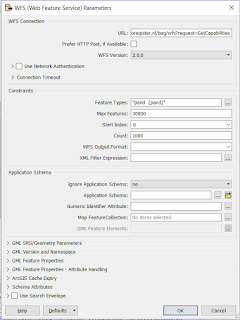
My previous post was on this awesome functionality (secretly?) added to the WFS reader .
If you use WFS OGC services a lot then I bet you are as exited as I am about this hidden gem.

In the past I have demonstrated how to use ResponcePaging in FME, but that required some inventive workaround to get all the features and overcoming the service's limitations.

Nowadays it's a matter of setting the reader settings accordingly, lean back and enjoy the logging happily passing by, while the service is queried.

For that sole reason, making my (and hopefully anybody that uses OGC WFS services) life easier I am giving the bronze medal to this FME 2016 functionality (my number 3)


This concludes my personal top 3 of FME 2016, I had lots of fun playing around with data this past year thanks to Safe Software and their great product.
I am expecting to have as much, if not more, fun with the upcoming FME 2017 functionalities.

The other top 3

Since the FME beta is always available and it's a great place to find out about new functionalities, I was searching for an idea for a post when I saw this tweet from @MadMansson which made me remember an old post where a list of certified FME professionals was created by parsing the HTML page of the Safe Software site.

So where does this all come together?  In FME 2017! where we can easily parse HTML with the brand new HTMLExtractor transformer (note to myself get cracking on CSS selectors).

So as a small homage to the previous post I put together a small workspace in which the countries with FME certified professionals are ordered by a ratio of the number of certified professionals per country divided by the country's area.

You might wonder what are the area units, well I just grabbed the first hit on Google for world countries shape and it is in the LL-WGS84 coordinate system.

Another thing to mention is that when I initially made the workspace Luxembourg was number one, but as you see recently somebody joined the club (welcome!) and now it is Singapore leading the list.

According to the same shapefile there are 43 other countries with a smaller area than Singapore, so if you are from Macau and you plan to get certified, I can promise you an eternal first on this list :)

The HTMLExtractor transformer makes it easy to grab information from the web pages and I personally think we will see more web related functionalities coming in FME 2017.

Looking forward to it!

Have a great New Year!