Thursday, December 29, 2016

2016 in retrospect

The end of the year is nearing and it is time to look back at the passing year and list my top 3 of FME 2016 functionalities.
At the same time its also a time to look forward to the coming year and the upcoming FME functionalities in FME 2017.

This year I actually wanted to combine both aspects into a double top 3, first my top 3 of FME 2016 functionalities and a second top 3 which involves a new FME 2017 functionality.


I hope I am not giving away a functionality that Safe intends to blog about, so if that is the case....my apologies in advance.
But personally I think that there will be so many awesome additions in 2017 that the little bit I am using doesn't even make a small dent in the pile of 2017 goodies that Safe can use to blog about.

My FME 2016 top 3

1. FeatureWriter

2016 started with the announcement (for me it felt more like a meteor fall...) that in the future FME will be used without any Readers and Writers
You probably all know what I am referring to, the birth of the FeatureWriter,
the transformer that would ".... shake most FME users to their very core!"
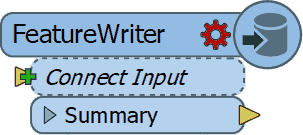
I have to admit that initially I didn't see what all the excitement was about, but as the year worn on and I started using it more and more, I can tell you right now that I wouldn't know how I could have done without it! (well probably using a lot more workspacesto get the same job done)

So it's no surprise that it is by far the number 1 on my top 3 for FME 2016 functionalities. Personally I think Safe succeeded in delivering what they promised and that the time of no Readers and Writers workspaces is nearing.

2. AttributeManager

The AttributeManager  was another FME 2016 functionality which slowly changes our approach into data transformation and in a good way.
No more AttributeCopier, AttributeCreator, AttributeRenamer, etc, etc necessary, a single super transformer to replace them all.
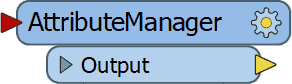
Personally I really like the AttributeManager for it capabilities, but there is one small annoying issue with it and that is the fact that it requires my attention way to often when the data schema changes.

So I have resorted to update the AttributeManager content when the workspace is finished, instead of continuously updating it. Despite that the AttributeManager makes so much possible with one single transformer and that is why it's my number 2 on the top 3 of FME 2016 functionalities.


3.WFS Paging settings

My previous post was on this awesome functionality (secretly?) added to the WFS reader .
If you use WFS OGC services a lot then I bet you are as exited as I am about this hidden gem.

In the past I have demonstrated how to use ResponcePaging in FME, but that required some inventive workaround to get all the features and overcoming the service's limitations.

Nowadays it's a matter of setting the reader settings accordingly, lean back and enjoy the logging happily passing by, while the service is queried.

For that sole reason, making my (and hopefully anybody that uses OGC WFS services) life easier I am giving the bronze medal to this FME 2016 functionality (my number 3)


This concludes my personal top 3 of FME 2016, I had lots of fun playing around with data this past year thanks to Safe Software and their great product.
I am expecting to have as much, if not more, fun with the upcoming FME 2017 functionalities.

The other top 3

Since the FME beta is always available and it's a great place to find out about new functionalities, I was searching for an idea for a post when I saw this tweet from @MadMansson which made me remember an old post where a list of certified FME professionals was created by parsing the HTML page of the Safe Software site.

So where does this all come together?  In FME 2017! where we can easily parse HTML with the brand new HTMLExtractor transformer (note to myself get cracking on CSS selectors).

So as a small homage to the previous post I put together a small workspace in which the countries with FME certified professionals are ordered by a ratio of the number of certified professionals per country divided by the country's area.

You might wonder what are the area units, well I just grabbed the first hit on Google for world countries shape and it is in the LL-WGS84 coordinate system.

Another thing to mention is that when I initially made the workspace Luxembourg was number one, but as you see recently somebody joined the club (welcome!) and now it is Singapore leading the list.

According to the same shapefile there are 43 other countries with a smaller area than Singapore, so if you are from Macau and you plan to get certified, I can promise you an eternal first on this list :)

The HTMLExtractor transformer makes it easy to grab information from the web pages and I personally think we will see more web related functionalities coming in FME 2017.

Looking forward to it!

Have a great New Year!


Tuesday, November 8, 2016

WTwFs?

HU?

I wanted to share with you something I accidentally came across while playing around with FME.
After finding this I was astonished that no special (spatial?) reference to this addition was made other than the standard documentation.

Doing a bit of snooping around I've found this addition was already added to the 2016.1.0.0 (build 16492) FME Desktop version.


Well what's it all about? well lets say that I consider it to be as much as a game changer as the introduction of THE game changer of  FME 2016, the FeatureWriter.

It might not be as all encompassing as the FeatureWriter itself, but it does make it a lot easier for many people that work with OGC services on a daily basis.

OGC

Several OGC (Open Geospatial Consortium) services formats have been supported for some time now in FME Desktop.

http://www.opengeospatial.org/
The Web Map Service (WMS) is great as a background map in your Data Inspector, but other than that there is not much use for it.

Now the WFS (Web Feature Service) that's more like it! Data that we can play around with in FME to transform, combine and write to our favorite formats.

The WFS comes in different versions and each version allows for a different interaction with the service.


The services are usually restricted to allow a certain maximum number of features to return per request. That is done so that the system serving the data should not be overrun by requesting all the features in one go.

The 2.0.0 version allows for ResponsePaging which is the mechanism that allows users to request all the data but in a orderly manner.

ResponsePaging 

In the past I have shown how it is possible to use this mechanism in FME, but now its made even easier!

Now is response paging incorporated into the WFS reader, so that once you select the 2.0.0 services version, new settings specific for response paging are available.


The Start Index and Count parameters enable you to control the response paging, sit back and relax as FME manages the data requests for you.

First of all excellent addition! but what blows my mind is that NO MENTION of this was reported or communicated!!
I really think you guys at FME headquarters need to take some more credit.


I know for sure that you just made my life and lots of others easier so that we can do this...


while FME is doing the heavy lifting.


Tuesday, March 1, 2016

XML is all around us

The Past

In 2014 I wrote about how to get all of the Dutch SDI (PDOK) services into FME by creating a custom reader.

With the new XML abilities in FME 2016, I was wondering if a better job can be done.

I set about creating a second custom reader that not only returns constantly updated results (services url's) but provides them in such a way that can be directly used futher down the transformation.

The Present

The new XML abilities in FME 2016 makes life so much easier. It's still early in the year but I am already sure that the new ability to scan the input XML is one of my top 3 of FME 2016.

Couple that with the setting to limit the maximum schema features to scan, and you get a very powerful tool that makes the days of wrestling with large XML files history.

The PDOK URL Reader

As with the previous custom reader, all of the services provided by PDOK are returned by the reader.
During the development I actually got a verification that the reader works properly since 2 new services were automatically added to the reader's results.

As mentioned before, I wanted to improve the previous reader, this time an attribute (ServiceFeatureType) containing the WFS feature types is provided.
This attribute, along with the url attribute, can be directly used in the FeatureReader transformer to access the WFS service.

Why only the WFS services? the short answer is that FME is all about data transformation and there is no point in making the feature types of the other services types (WMS, WCS and WMTS) available, because you cannot do much with them anyway.

The Future

The future is already here! (well if you were a kid in the 80's)
Anyway what I mean to say is that nowadays is it much easier to share.

The FME Hub is a new feature that makes sharing and publishing much easier. I wonder if it is the future of the FME Store, but that can only be verified by somebody from Safe.

The FME hub is where you can also find my PDOKURLReader among other amazing stuff.
This reader is self-updating and lets you for example access all of the PDOK WFS features of a specific area.

The following workspace shows how you could go about achieving that.
Example FME workspace

The results look like this.

BAG and AAN WFS features
Have fun and let me know what you think of it.

"FME" is a registered trademark of Safe Software Inc.

Friday, January 29, 2016

2015 in retrospect


2015 in retrospect

The new year is upon us and it is time for me to look back on the passing year.
About this time, a year ago, I published a post on my top 3 of FME 2014, this time I have something totally different in mind.


FME Cloud

For me the past year was without a doubt a FME Cloud year.
This all started with me trying out FME Cloud, after my curiosity about FME Cloud got the better of me. I wondered what I could do with FME Cloud.

One of the many great things of FME Cloud (and Safe Software) is that you get some 'playing around' credits to test it without any need to invest your own capital.

Did you fill in the FME Server questionnaire last year? and this year? well I did and guess what?
I got even more credit to play around with FME Cloud......that was just awesome!


I soon found out that having my own FME Cloud instance made me a power player.
Having all of the transformation powers of FME Server at my fingertips and not even have to pay for it! I couldn't believe my luck.

I realized that I need a good product to be able to make a dent in the over monopolized dutch GIS sector.
That's when I came up with the idea of a self serve data transformation, which also was my first contribution the the FMEWT.

Not that self serve data transformation is something new for FME Server, but what was new about it was (and still is) is the data transformed (BGT).

Up until today there is no such service available for the BGT and even the big guns of the GIS sector are still struggling with how to service the data to its customers.
The transformation trigger for this product is an email with a link in it, quite simple and easy.

Self Serve

Self serve BGT
After the FME Cloud BGT transformation the flood gates of self serve transformations were flung open.

This resulted in a second product in which the degree of complexity got a tiny bit more complex, this time it was not a link to the data, but the data itself that got the transformation started.

This was a very important learning step for me, since working with the resources section of FME Server is crucial when switching to FME Cloud.

The third product (SPLITS Translator) was again more complex, to develop. This time the layer within the CAD trigger data needed to be specified and correctly accessed.

Fortunately the options to use parameters and transfer them between workspaces is easily done (once you figure it out) and a must have for advance FME Cloud usage.

Lastly my final 2015 FME Cloud based product (Geocoder) was the most complex of them all.
This time not only did I need to develop buit in checks to make sure that the schema of the trigger data is as required but also multiple output formats are possible.

2016

With the release of FME 2016 (desktop) and the soon to be released FME Server I am sure lots of more FME'ing will be done this year.

Happy FME'ing!


"FME Cloud" is a registered trademark of Safe Software Inc.


Friday, July 31, 2015

SPLITS Translator

SPLITS Translator

The SPLITS Translator is a FME Cloud based translation service for creating SPLITS compliant GML.
As with previous products the trigger is an email (content + attachment) which starts the translation.
The results are returned via an email with a download link.

SPLITS

The division of property lots is a normal procedure when real estate sales and housing development activities are involved. 
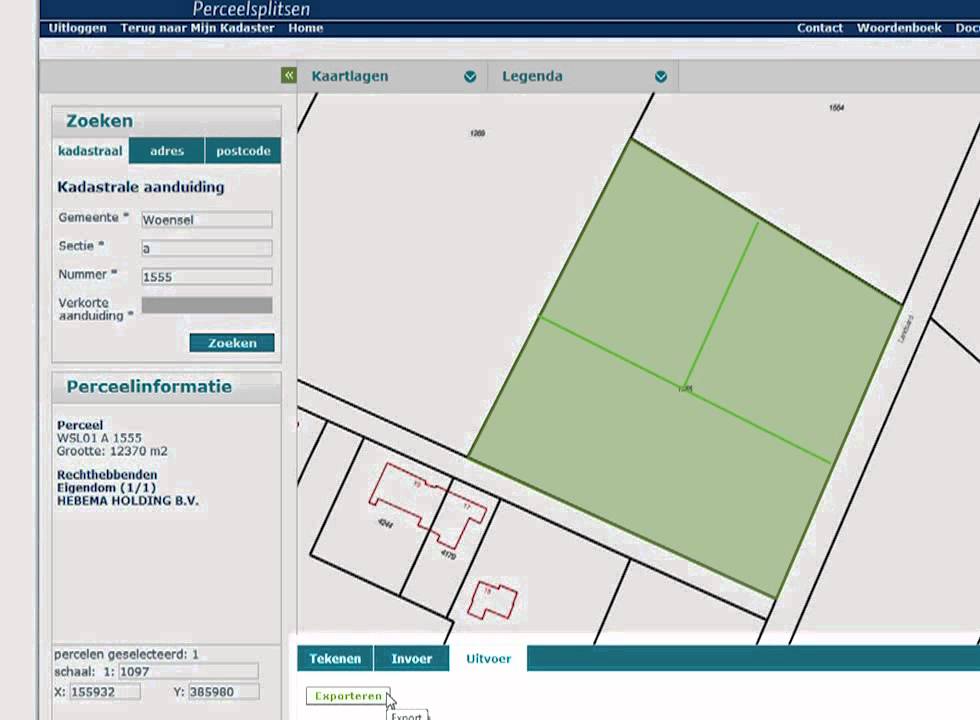
The Dutch cadastral web application SPLITS enables property lots splitting by sending all the data to the cadaster. 
The web application supports the drawing of new (temporary) boundary lines and also the use of GML (Geography Markup Language) as input. 
SPLITS application.

The use of GML has the following advantages: 
  • The drawing can take place within a professional CAD environment making it more flexible to make adjustments.
  • Multiple plots can be easily divided (think big size projects)
  • Fast processing within the application. 

FME Cloud and SPLITS

In my previous posts I have shown how you can start an event-driven ETL transformation via email + content and email + attachment
This time the FME Cloud transformation is actually a combination of the two types.
The email is the trigger and now the attachment and e-mail content are used. 


FME is the master of formats.
Master kick.
Normally you would use a separate (dedicated) reader per format, but there is also a generic reader that offers the possibility to read multiple formats with one reader. 
In this transformation I use such a generic reader that supports the most common CAD formats (DWG, DXF and DGN). 
Using the generic reader makes it is very easy to adjust the workspace in order to support other (desired) formats. 

This product has been added to the growing ETL Solution FME Cloud based products, see www.etlsolution.nl.

Also interested in event triggered FME Cloud based ETL transformations? contact me via itay@etlsolution.nl

Sunday, June 7, 2015

Transformation made easy: the FME Cloud way.

FME Cloud provides the possibilities to have data transformed and served without any detailed knowledge of the data schema or even an application.

In my previous post, based on my FMEWT 2015 presentation, I have demonstrated how easy it is to send FME an email and let FME do the heavy lifting of getting the data, transforming it and making it available.
In that scenario the user only had to select the data and send the url.
In the next scenario the user already has some data which he needs translated. So here the email is sent with an attachment.

FME Server's email capabilities are described by a series of tutorials on the FME Knowledge Center (latest name for the old FMEPedia)
In the tutorials all the information necessary for making the most out of the incoming email is addressed.

The AERIUS project  was also presented on the FMEWT, since FME is everywhere....

The AERIUS calculator is one of the components of the national PAS project which results in a GML file.
Reading GML should not be an issue for a seasoned FME user and with the help of the Knowledge Center a beginner shouldn't have much of a problem figuring out how to point to the schema document and let FME do the work.


But what if you don't have FME or you are only interested in usable results?


Well the answer to that is: FME Cloud !

To demonstrate this I have used FME's powers to build a simple and easy to use AERIUS2FGDB translation.
The translation is event triggered which means you need to start it.


How? well that's easy:

  1. send an email to: fme@etlsolution.nl
  2. Email topic: AERIUS2FGDB_b28ba3b0-0da6-11e5-a040-028deac61efd
  3. Email attachment : AERIUS GML

Result?
The AERIUS GML gets translated to filegeodatabase (FGDB) and is made available via an email with a download link.

Are just interested in testing the methodology behind the product? I have already a AERIUS GML available for you to send as an attachment.

Interested in applying this for your organisation and your specific needs? dont esitate to contact me via itay@etlsolution.nl.

Free testing this product will be available from 8/6/2015 until 10/6/2015 between 9:00 AM and 16:00 PM (CET)

Monday, May 18, 2015

BGT via FMECloud

FME Cloud

What is FME Cloud? Simply put : FME Cloud FME Server in the Cloud. FME Cloud is the first location-aware iPaaS ( Integration Platform as a Service) and that means you have all the FME Server functionality at your disposal, without the hardware . 
See the following link for more information on FME Cloud.
One of the many advantages of FME Cloud is the ability to activate processes via an external trigger (e.i. event driven ) . Examples of such an external trigger can be an e-mail or a sensor value change

BGT

The creation of the BGT ( or The Registration Large Scale Topography as Goggle translate calls it ) is in full swing , many of the stake holders are feverishly working on the assembly of this nation scale polygon map. The first stage is expected to be completed on January 2016. Stake holders deliver their part of the BGT to the national facility (LV) and it is from there made ​​available in CityGML format via PDOK (Dutch national SDI). For an overview of the already available BGT in the LV see: BGTWeb 
The CityGML format cannot be directly used in GIS applications or loaded into a database,  a format conversion (something FME is great at ) must first take place.

Event driven BGT2FGDB conversion.

FME is the tool for spatial data conversion and FME Cloud is the cloud tool for spatial data conversion :)

The trigger

The format conversion is carried out with FME Cloud and is started via a trigger, in this case the trigger is an e-mail . There are some conditions that the trigger has to meet in order to start the process, for example a selected map tile link should be provided.

The conversion

During the format conversion a number of format -specific adjustments are done. Examples of these changes include: removing specific format invalid characters , conversion to uppercase , null values ​​mapping, date conversions, new geometry is created (think of house numbering and street names labels)

The result.

The result is a uniform and complete BGT data set in FileGeodatabase ( FGDB ) format. The FGDB is a widely used and efficient GIS format . This format can be used in both closed- and open-source GIS applications. After performing the format conversion , the result is made ​​available via an e-mail with a download  link.

Advantages and properties of the conversion are : 

  • Easy to use. 
  • No application is required. 
  • Online and always available. 
  • Reliably and quickly. 
  • Outcome ready for database read-in action and GIS applications. 
  • Unique : There is no comparable data distribution method ( in the Netherlands)

Results displayed in QGIS


This product is designed for the Dutch market if you are interested and want to set up something similar please contact us via info@etlsolution.nl